No products in the cart.
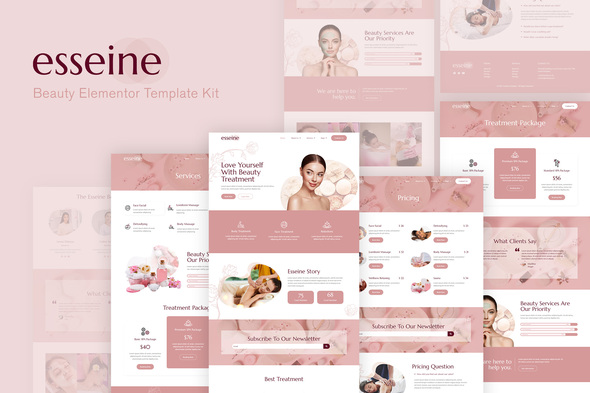
Introducing Esseine, an Elementor Template Kit specially crafted for professional spa businesses. Using the powerful Elementor Page Builder plugin for WordPress, Esseine offers a comprehensive suite of templates. This kit includes essential pages such as Home, About Us, Team, Services, Treatment Packages, Pricing, FAQs, Gallery, Blog, Contact Us, and a 404 Error page. Perfect for enhancing your spa’s online presence, Esseine will elevate your website design and usability.
By choosing Esseine, you ensure your site is visually captivating and user-friendly, attracting more clients and enhancing their experience. With its modern design and intuitive structure, Esseine is ideal for promoting spa treatments, wellness services, and relaxation experiences.
Templates Available:
- Home1
- About Us
- Team
- Services
- Treatment Package
- Pricing
- FAQs
- Blog
- Gallery
- 404 Error Page
- Contact Us
Plugin Dependencies:
- Elementor
- Essential Addons for Elementor
- Metform
- Header & Footer Builder for Elementor
Fonts Used:
- Marcellus
- Sarabun
How to Use Template Kits:
- Install and activate the “Envato Elements” plugin from the WordPress plugins menu.
- Download the kit file and do not unzip it.
- Navigate to Elements > Installed Kits and click the Upload Template Kit button. Alternatively, connect your account to link your subscription and import directly.
- Look for the orange banner at the top and click Install Requirements to load any necessary plugins.
- Start by importing the Global Kit Styles.
- Import templates one at a time, available under Templates > Saved Templates.
- Create a new page and click Edit with Elementor.
- Access the page settings via the gear icon at the builder’s lower-left corner; select Elementor Full Width and hide the page title.
- Click the gray folder icon, navigate to My Templates, and import the desired page template for customization.
If you have Elementor Pro, you can customize headers and footers via the Theme Builder, allowing for greater flexibility in design.
How to Import Metforms:
- Import the Metform block templates.
- Import the relevant page template, enabling the Navigator for easy navigation.
- Find the Metform widget and click Edit Form. Select New, then Edit Form to access the builder.
- Click the ‘Add Template’ gray folder icon.
- Select your imported Metform template from the My Templates tab, then click ‘Insert’ (choose No for page settings).
- After loading the template, customize as desired and click ‘Update & Close.’ The form will appear within the template.
- Click Update to save changes.
Setting Up Global Header and Footer:
- Import the header and footer template.
- Go to Appearance > Header Footer and click the Add New button.
- Assign a title, select Header, choose “Display on Entire Site,” and click Publish.
- Edit with Elementor and import the header template using the gray folder icon. Update afterward.
- Repeat the process for the footer to ensure a cohesive design.
This Template Kit includes demo images from Envato Elements. To use these images legally on your website, ensure you have the appropriate licenses or opt for your own images to replace them.
By utilizing Esseine, you can transform your spa’s online presence, ensuring potential clients find all the information they need easily while experiencing an engaging, soothing aesthetic. Whether it’s for beauty treatments, relaxation therapies, or wellness services, Esseine has you covered for a successful digital spa experience.
Get this wordpress theme or any wordpress theme of your choice for only 10usd whatsapp +2349134764136